Revisado por: Equipo de Educación en Trading de NordFX
Las plantillas en MT5 guardan la configuración de un solo gráfico, mientras que los perfiles guardan todo el espacio de trabajo con múltiples gráficos. Las plantillas son útiles para aplicar la misma configuración de indicadores en distintos mercados, mientras que los perfiles ayudan a los traders a cambiar entre diseños de trading completos.
Las plantillas y los perfiles en MetaTrader 5 (MT5) ayudan a los traders a guardar la configuración de los gráficos y el diseño del espacio de trabajo. Una plantilla guarda la configuración de un gráfico, incluidos los indicadores, los colores y los ajustes visuales. Un perfil guarda todo el espacio de trabajo de MT5, incluidos varios gráficos abiertos y su disposición. Los traders usan las plantillas para mantener la coherencia de los gráficos y los perfiles para una gestión más rápida del espacio de trabajo.
¿Qué son las plantillas en MT5?
Una plantilla en MT5 es una configuración de gráfico guardada que puede incluir indicadores, colores del gráfico, tipo de gráfico, ajustes de escala y otras preferencias visuales del gráfico.
Las plantillas son útiles cuando un trader quiere aplicar la misma configuración de análisis técnico a distintos instrumentos sin reconstruir el gráfico manualmente.
Por ejemplo, un trader puede crear una plantilla de MT5 con medias móviles, RSI y MACD, y luego aplicarla a pares de divisas, oro, índices o gráficos de CFD sobre criptomonedas.
¿Qué son los perfiles en MT5?
Un perfil en MT5 es un espacio de trabajo guardado que almacena los gráficos abiertos y su disposición dentro de la plataforma de trading.
Los perfiles son útiles cuando los traders supervisan distintos mercados, estrategias o sesiones de trading. En lugar de abrir y organizar los gráficos manualmente cada vez, un trader puede guardar el espacio de trabajo completo como un perfil y cargarlo más tarde.
Por ejemplo, un perfil puede usarse para pares de divisas, otro para metales y otro para CFD sobre criptomonedas.
¿Cuál es la diferencia entre plantillas y perfiles en MT5?
La principal diferencia es que las plantillas guardan la configuración de un gráfico, mientras que los perfiles guardan el espacio de trabajo completo de MT5.
Característica | Plantilla de MT5 | Perfil de MT5 |
Propósito principal | Guarda la configuración de un gráfico | Guarda el espacio de trabajo completo |
Guarda indicadores | Sí | Sí, a través de gráficos guardados |
Guarda colores del gráfico | Sí | Sí |
Guarda múltiples gráficos | No | Sí |
Guarda la disposición del espacio de trabajo | No | Sí |
Mejor uso | Repetir configuraciones de gráficos | Organizar espacios de trabajo de trading |
En términos simples, las plantillas controlan cómo se ve y funciona un gráfico, mientras que los perfiles controlan cómo se organiza todo el espacio de trabajo de MT5.
¿Por qué los traders usan plantillas y perfiles en MT5?
Los traders usan plantillas y perfiles en MT5 para ahorrar tiempo, reducir el trabajo repetitivo de configuración y mantener la coherencia del análisis de los gráficos.
Esto es especialmente útil para traders que usan varios indicadores, supervisan varios mercados o cambian entre distintas estrategias.
Usos comunes incluyen:
• aplicar la misma configuración de indicadores a varios gráficos
• separar el análisis a corto y largo plazo
• crear diferentes espacios de trabajo para distintas clases de activos
• cambiar entre estrategias de trading más rápido
• reducir errores en la configuración de la plataforma
El comportamiento observado en el trading de MT4/MT5 sugiere que los traders con diseños de gráficos estructurados suelen dedicar menos tiempo a tareas repetitivas de configuración y más tiempo al análisis real del mercado.
Cómo guardar una plantilla en MT5
Para guardar una plantilla en MT5, primero configura un gráfico y luego usa el menú contextual del gráfico para guardar la configuración.
- Abre un gráfico en MetaTrader 5.
- Añade los indicadores, colores y ajustes visuales necesarios.
- Haz clic derecho dentro de la ventana del gráfico.
- Selecciona “Plantillas”.
- Haz clic en “Guardar plantilla”.
- Introduce un nombre claro para la plantilla.
- Haz clic en “Guardar”.
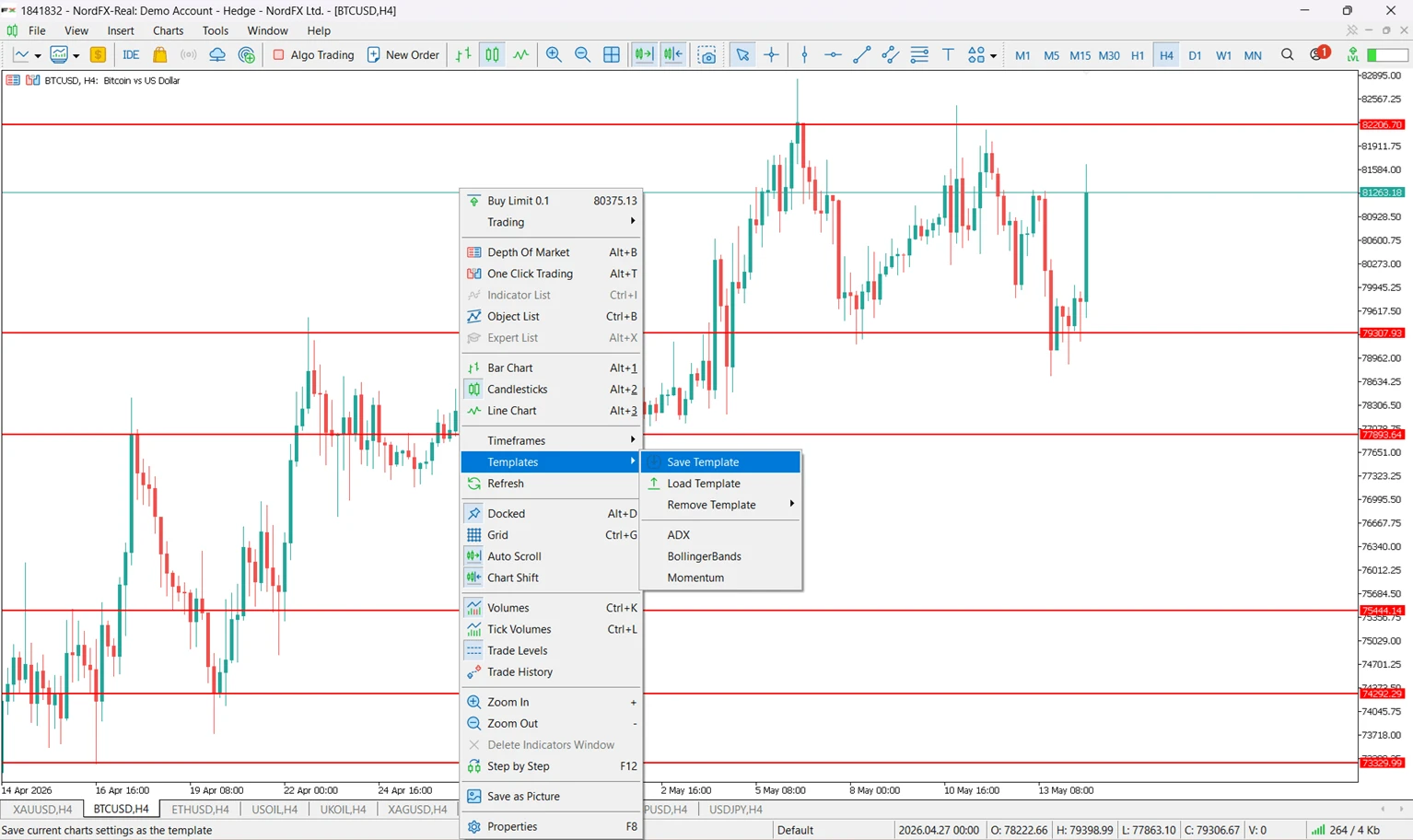
Después de guardarla, la plantilla puede aplicarse a otros gráficos.
Ejemplos de nombres de plantillas:
• trend-following-template
• scalping-template
• clean-price-action-template
• crypto-analysis-template
• swing-trading-template
Cómo aplicar una plantilla en MT5
Para aplicar una plantilla en MT5, abre el gráfico objetivo y carga la plantilla guardada desde el menú contextual del gráfico.
- Abre el gráfico al que quieres aplicar la plantilla.
- Haz clic derecho dentro de la ventana del gráfico.
- Selecciona “Plantillas”.
- Haz clic en “Cargar plantilla”.
- Elige el archivo de plantilla guardado.
- Haz clic en “Abrir”.
El gráfico seleccionado mostrará entonces la configuración guardada, incluidos los indicadores y las preferencias visuales.
Cómo guardar un perfil en MT5
Para guardar un perfil en MT5, organiza primero tus gráficos y luego guarda el espacio de trabajo a través del menú de perfiles de la plataforma.
- Abre todos los gráficos que quieras incluir en el espacio de trabajo.
- Organiza los gráficos dentro de MT5.
- Abre el menú “Archivo”.
- Selecciona “Perfiles”.
- Haz clic en “Guardar perfil como”.
- Introduce un nombre para el perfil.
- Confirma el guardado.
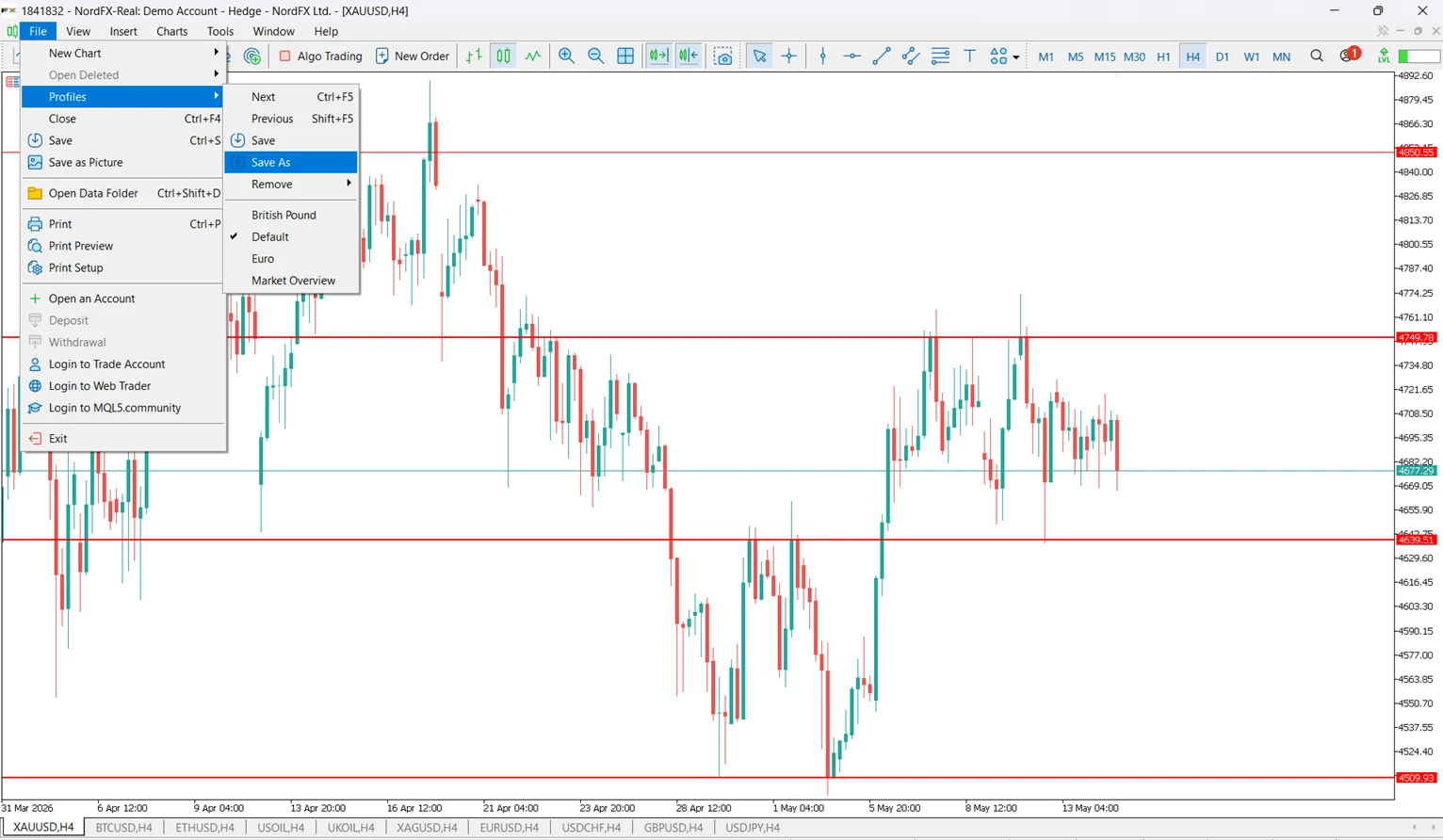
El perfil almacenará la disposición del espacio de trabajo y facilitará volver más tarde al mismo entorno de gráficos.
Cómo cambiar entre perfiles en MT5
Para cambiar de perfil en MT5, abre el menú de perfiles y elige el espacio de trabajo guardado que quieres cargar.
- Abre el menú “Archivo”.
- Selecciona “Perfiles”.
- Elige el nombre del perfil de la lista.
MT5 cargará el espacio de trabajo guardado con sus gráficos y su disposición.
Esto es útil al pasar entre diferentes tareas de trading, como el análisis matutino del mercado, el seguimiento de criptomonedas o la revisión al cierre del día.
Ejemplo práctico de plantillas y perfiles en MT5
Un trader que usa MT5 a través de un bróker multi-activo como NordFX puede crear varias plantillas y perfiles para distintos mercados y estrategias.
Necesidad de trading | Ejemplo de plantilla | Ejemplo de perfil |
Trading de divisas a corto plazo | Medias móviles + RSI | Espacio de trabajo de pares de divisas principales |
Análisis del oro | Soporte/resistencia + MACD | Espacio de trabajo de metales |
Trading de CFD sobre criptomonedas | Indicadores centrados en la volatilidad | Espacio de trabajo de CFD sobre criptomonedas |
Análisis de gráfico limpio | Sin indicadores, solo niveles de precio | Espacio de trabajo de price action |
Esta estructura ayuda a los traders a mantener los gráficos organizados sin mezclar distintas estrategias en un único espacio de trabajo abarrotado.
¿Se pueden usar juntas las plantillas y los perfiles?
Sí. Las plantillas y los perfiles se pueden usar juntas en MT5.
Un trader puede aplicar distintas plantillas a gráficos individuales y luego guardar todos esos gráficos dentro de un solo perfil. Esto permite crear un espacio de trabajo completo en el que cada gráfico ya tiene la configuración correcta.
Por ejemplo, un “perfil de CFD sobre criptomonedas” puede incluir varios gráficos de criptomonedas, cada uno con una plantilla basada en volatilidad aplicada.
¿Las plantillas de MT5 guardan operaciones abiertas?
No. Las plantillas de MT5 no guardan operaciones abiertas, saldos de cuenta, órdenes pendientes ni historial de operaciones.
Las plantillas solo guardan la configuración del gráfico. Los perfiles guardan la disposición del espacio de trabajo, pero tampoco guardan fondos de la cuenta ni posiciones. La información de la cuenta de trading es independiente de la personalización del gráfico.
Esta distinción es importante porque las plantillas y los perfiles son herramientas de espacio de trabajo, no herramientas de gestión de operaciones.
¿Las plantillas y perfiles de MT5 están disponibles en móvil?
Las plantillas y los perfiles de MT5 son principalmente funciones de la plataforma de escritorio.
La aplicación móvil de MT5 permite ver gráficos y cierta personalización, pero MT5 en escritorio ofrece un control más completo del espacio de trabajo. Los traders que dependen mucho de las plantillas y los perfiles suelen gestionarlos en la versión de escritorio.
Errores comunes al usar plantillas y perfiles en MT5
Error | Por qué ocurre | Cómo evitarlo |
Confundir plantillas con perfiles | Ambos guardan ajustes relacionados con gráficos | Recuerda: las plantillas guardan un gráfico, los perfiles guardan espacios de trabajo |
Guardar un perfil demasiado pronto | El espacio de trabajo aún no está completamente organizado | Organiza todos los gráficos antes de guardar el perfil |
Sobrecargar un perfil | Se añaden demasiados gráficos a un solo espacio de trabajo | Crea perfiles separados por mercado o estrategia |
Usar nombres de archivo poco claros | Las plantillas y los perfiles se vuelven difíciles de identificar | Usa nombres descriptivos como “RSI-MACD-swing” |
Esperar que las plantillas guarden operaciones | Las herramientas del gráfico se confunden con los datos de la cuenta | Usa las plantillas solo para la configuración del gráfico |
Faltan indicadores personalizados | Una plantilla usa indicadores que no están instalados en la plataforma | Instala los indicadores necesarios antes de cargar la plantilla |
Cómo organizar eficientemente las plantillas y perfiles de MT5
La mejor manera de organizar las plantillas y perfiles de MT5 es separarlos por finalidad de trading.
Categorías útiles incluyen:
• tipo de mercado
• marco temporal
• sesión de trading
• configuración de indicadores
• estilo de análisis
Estructura de ejemplo:
Categoría | Ejemplo de plantilla o perfil |
Por mercado | currency-pairs-profile, metals-profile, crypto-profile |
Por estrategia | trend-template, breakout-template, price-action-template |
Por marco temporal | intraday-profile, swing-profile, long-term-profile |
Por sesión | london-session-profile, new-york-session-profile |
Un sistema de nombres sencillo facilita encontrar y reutilizar la configuración correcta más adelante.
Mejores prácticas para usar plantillas y perfiles en MT5
Las plantillas y perfiles funcionan mejor cuando son simples, consistentes y tienen nombres claros.
Mejores prácticas:
• Usa una plantilla para una configuración clara de un gráfico.
• Evita añadir demasiados indicadores a una sola plantilla.
• Guarda los perfiles solo después de que el espacio de trabajo esté completamente organizado.
• Crea perfiles separados para distintos mercados o estrategias.
• Haz copias de seguridad de las plantillas y perfiles importantes al cambiar de dispositivo.
• Revisa regularmente las plantillas antiguas y elimina las que no uses.
Una buena organización del espacio de trabajo puede hacer que MT5 sea más fácil de usar, especialmente para traders que supervisan varios instrumentos.
FAQ
¿Qué es una plantilla en MT5?
Una plantilla en MT5 es una configuración de gráfico guardada. Puede incluir indicadores, colores, tipo de gráfico y otros ajustes visuales del gráfico.
¿Qué es un perfil en MT5?
Un perfil en MT5 es un espacio de trabajo guardado. Almacena los gráficos abiertos y su disposición dentro de la plataforma.
¿Cuál es la principal diferencia entre plantillas y perfiles en MT5?
Las plantillas guardan la configuración de un gráfico, mientras que los perfiles guardan el espacio de trabajo completo con múltiples gráficos.
¿Puede un perfil de MT5 incluir varias plantillas?
Sí. Cada gráfico dentro de un perfil puede tener su propia plantilla aplicada.
¿Las plantillas de MT5 guardan indicadores?
Sí. Las plantillas de MT5 pueden guardar los indicadores aplicados a un gráfico, siempre que esos indicadores estén disponibles en la plataforma.
¿Los perfiles de MT5 guardan operaciones abiertas?
No. Los perfiles guardan la disposición del espacio de trabajo, no las operaciones abiertas, los saldos ni la actividad de la cuenta.
¿Se pueden usar plantillas de MT5 en distintos instrumentos?
Sí. Una plantilla puede aplicarse a distintos instrumentos, incluidos pares de divisas, metales, índices, acciones y gráficos de CFD sobre criptomonedas.
¿Son útiles las plantillas y perfiles para principiantes?
Sí. Las plantillas y perfiles ayudan a los principiantes a mantener la coherencia en la configuración de los gráficos y a reducir el trabajo repetitivo de configuración de la plataforma.
Conclusiones clave
• Las plantillas de MT5 guardan la configuración de un gráfico.
• Los perfiles de MT5 guardan el espacio de trabajo completo con múltiples gráficos.
• Las plantillas son ideales para repetir configuraciones de análisis técnico.
• Los perfiles son ideales para organizar mercados, estrategias y sesiones.
Artículos relacionados
Plataforma de Trading MetaTrader 5
Plataformas de Trading en NordFX
Cómo añadir indicadores en MetaTrader 5
Explicación de los indicadores de MT5
Centro de aprendizaje de NordFX
Conoce al autor
Vanessa Polson es directora de marketing en NordFX y cuenta con más de doce años de experiencia en marketing online dentro del sector de los servicios financieros. Ha desarrollado y ejecutado campañas basadas en datos en canales de búsqueda, redes sociales y display en entornos internos. Su trabajo se centra en traducir productos financieros complejos y herramientas de trading en contenido educativo claro y práctico, lo que le proporciona una visión amplia y completa del panorama global del trading.
Conecta con Vanessa en LinkedIn.
Volver Volver